Sorting Algorithm Visualizer in Canvas 2D
Design a visual lab to compare Bubble, Merge, Quick, and other sorting algorithms with events, metrics, and efficient Canvas rendering.

A sorting visualizer should do more than move bars until they look ordered. Its job is to reveal why an algorithm compares, swaps, writes, divides, or reserves memory, and to measure those decisions without confusing them with animation speed.
The most useful architecture separates four pieces: the algorithm produces an event trace, a reducer applies those events to visual state, a scheduler decides when to advance, and Canvas 2D draws the result.
The algorithm determines the work; the scheduler only determines how long the user takes to see it.
01. Separate computation, trace, and playback
There are three different clocks:
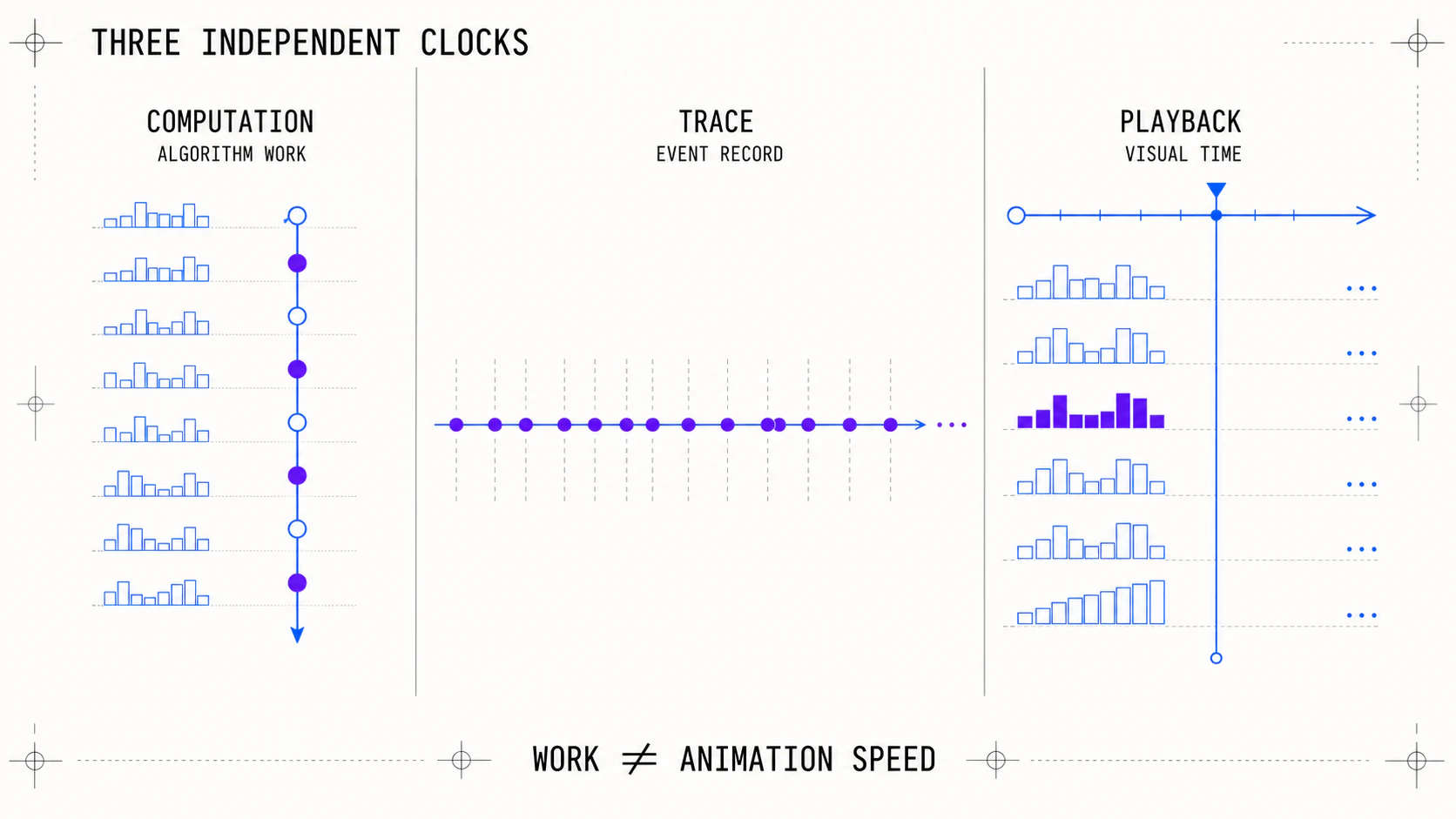 Three independent clocks: computation, event trace, and visual playback
| Phase | What happens | What it should measure |
|---|---|---|
| computation | the algorithm decides the next change | comparisons, swaps, writes, auxiliary memory |
| trace | changes are stored or streamed | event count and recording size |
| playback | events become frames | visual duration, FPS, and events per second |
Frames are not an algorithm metric. Two identical executions may take one or twenty seconds depending on selected playback speed. To compare algorithms, run computation without pauses; to teach, replay the same trace at a readable pace.
It is also useful to preserve identity, not only value:
type SortItem = {
  id: string;
  value: number;
};

type SortMetrics = {
  comparisons: number;
  swaps: number;
  writes: number;
  auxiliaryPeak: number;
};
The id makes stability testable. When two items share the same value, a stable algorithm must preserve their relative order even if their bars have equal height.
02. One event contract every algorithm can speak
The algorithm should not know about Canvas, colors, or duration. It works on a copy and emits discrete facts that another layer can replay.
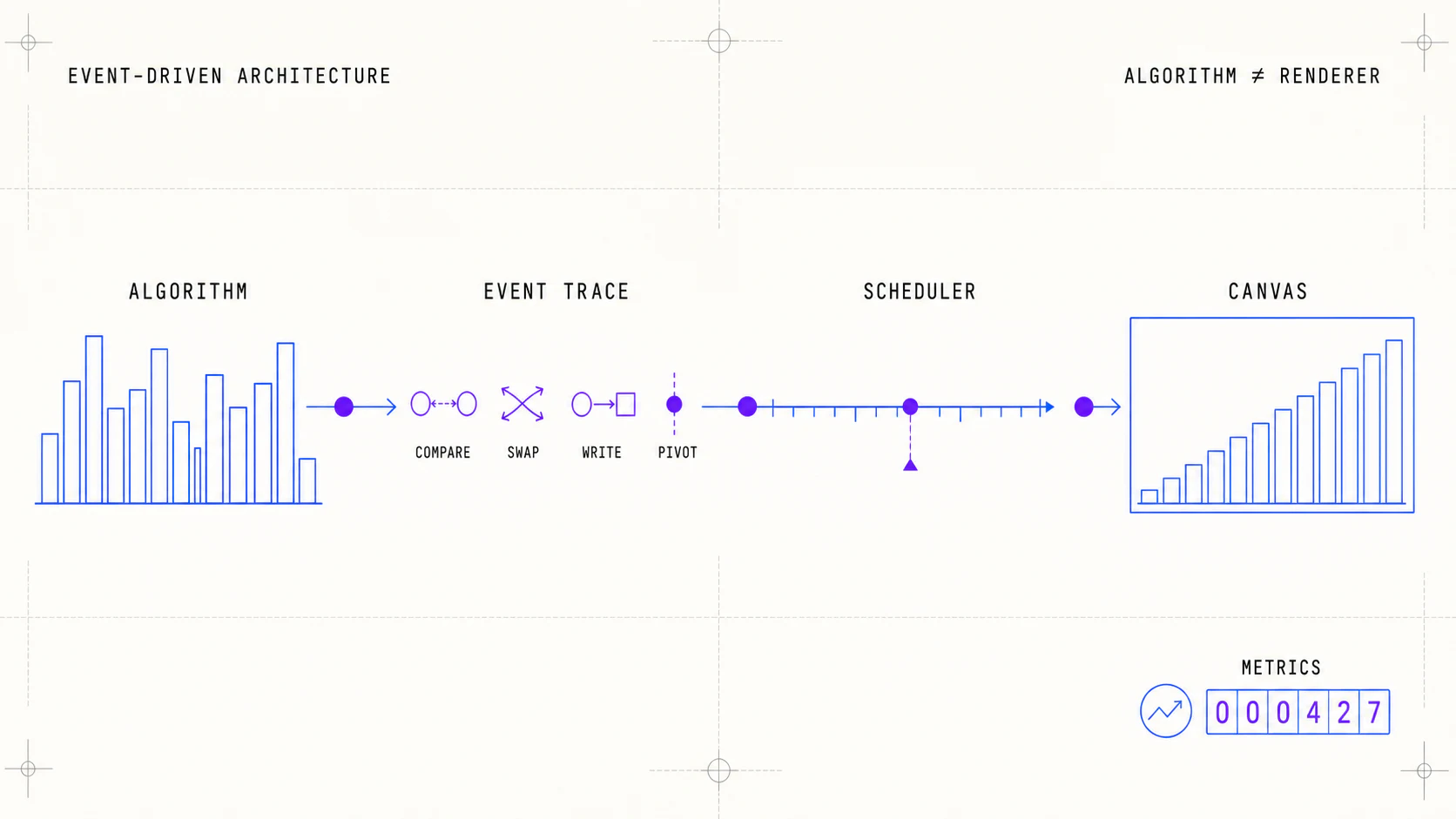 Event-driven architecture from the algorithm through the scheduler to Canvas
type SortEvent =
  | { type: "compare"; indices: [number, number] }
  | { type: "swap"; indices: [number, number] }
  | { type: "write"; index: number; item: SortItem }
  | { type: "bufferWrite"; index: number; item: SortItem }
  | { type: "pivot"; index: number }
  | { type: "range"; start: number; end: number }
  | { type: "markSorted"; index: number };
This vocabulary covers local exchanges, buffer writes, pivots, and subranges. The renderer can show a second row for auxiliary memory without forcing Merge Sort to draw it.
| Layer | Responsibility | Must not know |
|---|---|---|
| instrumented algorithm | sort a copy and emit events | pixels, colors, FPS |
| visual reducer | apply an event to displayed state | internal algorithm rules |
| scheduler | pause, step, and speed | sorting theory |
| renderer | turn state into Canvas geometry | how the event was calculated |
| metrics panel | count event semantics | animation duration |
A recorded trace supports pause, rewind, jump-to-end, and repeated playback without rerunning the algorithm. For huge arrays, it can stream incrementally and retain only periodic checkpoints.
03. Instrument a baseline and compare fairly
Bubble Sort is a good pipeline test because it alternates comparisons and local swaps in a way that is easy to verify.
function* bubbleSort(input: SortItem[]): Generator<SortEvent> {
  const values = input.map((item) => ({ ...item }));

  for (let end = values.length - 1; end > 0; end -= 1) {
    for (let index = 0; index < end; index += 1) {
      yield { type: "compare", indices: [index, index + 1] };

      if (values[index].value > values[index + 1].value) {
        [values[index], values[index + 1]] = [
          values[index + 1],
          values[index],
        ];
        yield { type: "swap", indices: [index, index + 1] };
      }
    }

    yield { type: "markSorted", index: end };
  }

  if (values.length > 0) yield { type: "markSorted", index: 0 };
}
For a valid comparison, every algorithm must receive a clone of the same dataset. The preset, size, and random seed should remain visible. If data changes between runs, the metrics table stops explaining algorithms and starts mixing two different problems.
Metrics also need consistent rules:
- a comparison counts when two keys are evaluated;
- a swap counts as an exchange and commonly implies multiple writes;
- a write counts every modified position in the primary array;
- auxiliary memory records its peak, not how many frames it remained visible;
- benchmark time excludes animation, layout, and painting.
04. Make each algorithm's signature visible
Not every algorithm should look like a sequence of swaps.
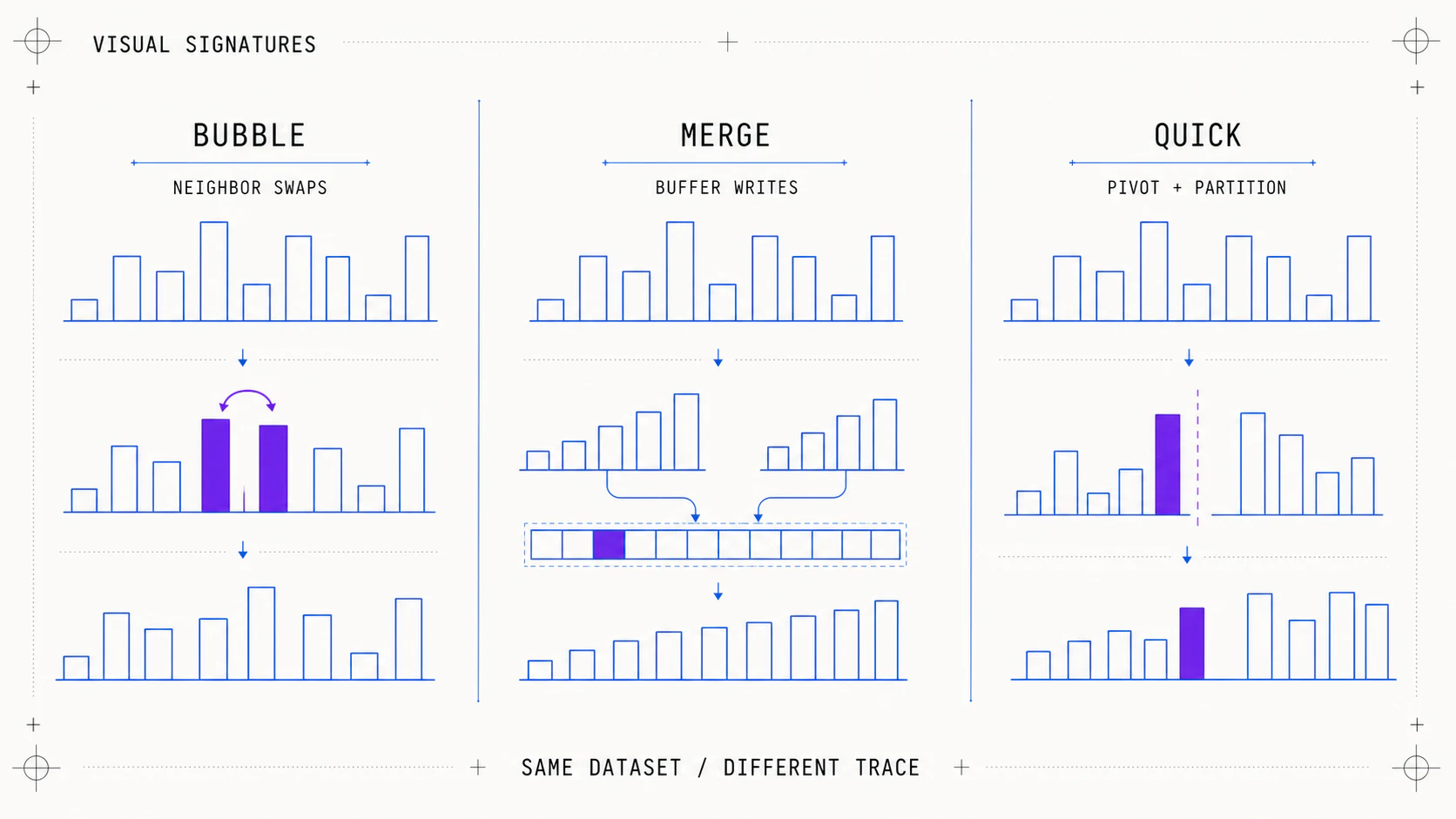 Visual signatures of Bubble Sort, Merge Sort, and Quick Sort on the same dataset
| Algorithm | Visual signature | Additional state |
|---|---|---|
| Bubble | adjacent pairs and a sorted tail | comparison, swap, sorted |
| Insertion | one item travels through a sorted prefix | current, shift |
| Merge | ranges divide and a buffer writes back | range, bufferWrite |
| Quick | pivot and smaller/larger regions | pivot, partition |
| Heap | implicit tree and heap restoration | root, heap boundary |
| Radix | digit distribution and buckets | digit, bucket |
Merge Sort needs a complete example: besides comparing both halves, it must copy their remainders and write the entire buffer back.
function* mergeRange(
  values: SortItem[],
  start: number,
  middle: number,
  end: number,
): Generator<SortEvent> {
  const buffer: SortItem[] = [];
  let left = start;
  let right = middle;

  while (left < middle && right < end) {
    yield { type: "compare", indices: [left, right] };
    buffer.push(
      values[left].value <= values[right].value
        ? values[left++]
        : values[right++],
    );
  }

  while (left < middle) buffer.push(values[left++]);
  while (right < end) buffer.push(values[right++]);

  for (let offset = 0; offset < buffer.length; offset += 1) {
    const index = start + offset;
    yield { type: "bufferWrite", index: offset, item: buffer[offset] };
    values[index] = buffer[offset];
    yield { type: "write", index, item: buffer[offset] };
  }
}
The comparison uses <= to take the left item first when values tie; that small decision preserves stability and can be demonstrated through the id values.
05. Crisp Canvas and a scheduler independent of FPS
Canvas should use CSS size for layout and scale its backing buffer by devicePixelRatio. Resizing it every frame clears the context and wastes work; do it only when the container or DPR changes.
function resizeCanvas(canvas: HTMLCanvasElement, width: number, height: number) {
  const dpr = window.devicePixelRatio || 1;
  canvas.width = Math.round(width * dpr);
  canvas.height = Math.round(height * dpr);
  canvas.style.width = `${width}px`;
  canvas.style.height = `${height}px`;

  const context = canvas.getContext("2d")!;
  context.setTransform(dpr, 0, 0, dpr, 0, 0);
  return context;
}
Consuming a fixed number of events per frame makes a 120 Hz display play twice as fast as a 60 Hz display. Speed should depend on elapsed time:
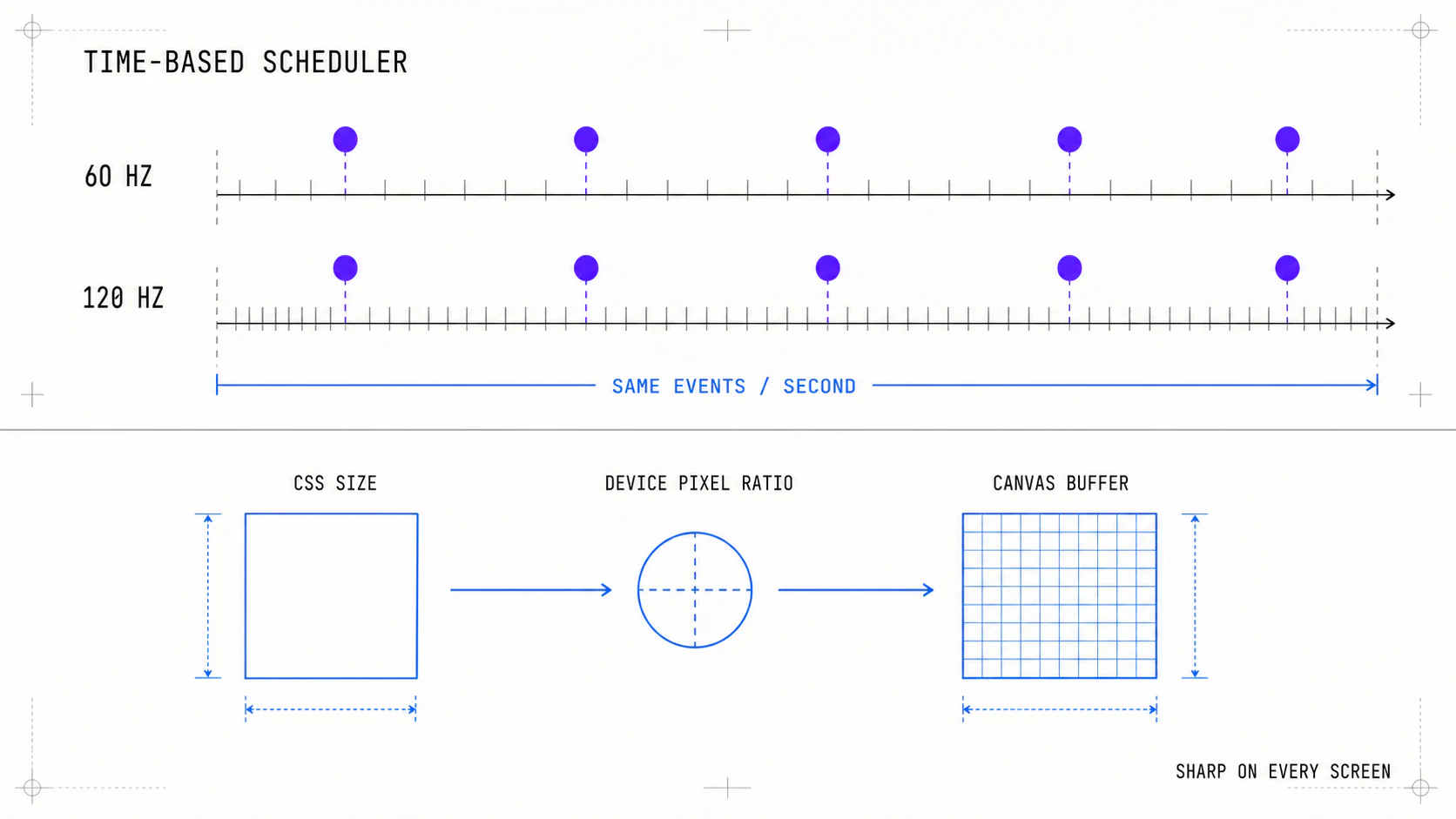 Time-based scheduler at 60 and 120 Hz and HiDPI scaling of the Canvas buffer
let lastTime = performance.now();
let budget = 0;

function tick(now: number) {
  const elapsed = Math.min(now - lastTime, 100);
  lastTime = now;
  budget += (elapsed * eventsPerSecond) / 1000;

  while (budget >= 1 && playback.isRunning()) {
    playback.applyNext();
    budget -= 1;
  }

  renderer.draw();
  requestAnimationFrame(tick);
}
The time cap prevents an event avalanche after returning from an inactive tab. The step button applies exactly one event; the benchmark, by contrast, executes the trace without requestAnimationFrame.
06. Controls, validation, and definition of done
The lab needs presets that expose different behavior: seeded random, sorted, reversed, nearly sorted, and few unique values. Quick Sort reveals its pivot strategy with ordered data; Insertion Sort shines with few shifts; stability is easiest to see with duplicates.
Minimum controls are algorithm, size, preset, speed, pause, step, reset, and cancellation. A new run should invalidate the previous one through an identifier or AbortController, preventing late events from modifying a freshly generated dataset.
A run is complete only when three conditions hold:
- Values are in nondecreasing order.
- The result contains exactly the same
idvalues as the input. - If the algorithm promises stability, equal-valued items preserve their relative
idorder.
The panel should separate algorithm metrics—comparisons, swaps, writes, and auxiliary memory—from presentation metrics—FPS, playback duration, and events per second. Users can then learn slowly and compare honestly on the same data.
The practical implementation starts with a small contract, Bubble Sort, and a simple renderer. Once tracing, playback, and tests are trustworthy, Merge, Quick, Heap, or Radix become new narratives on the same engine rather than independent, fragile visualizers.